
Projects
Add tags to a project
Label a project with tags so you and other quilters can find similar quilts.
Updated Nov 16, 2026 · iPhone, Android and web · 1 min read
Tags are short labels such as #ModernQuilt or #BabyQuilt. They group your projects, and on public projects they let other quilters find your work.
Add tags
- Open the project and tap Edit Project, or start a new project.
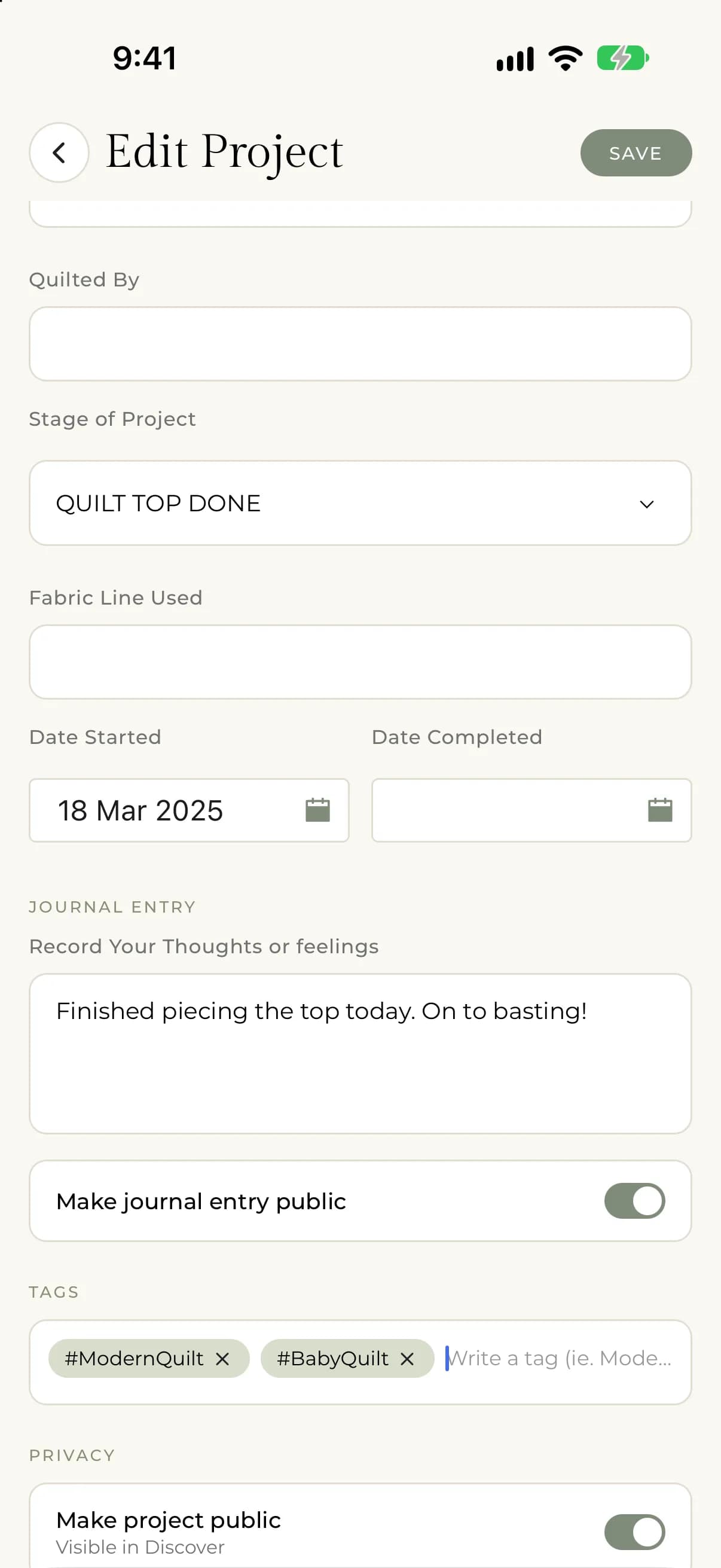
- Scroll to Tags.
- Type a tag and press enter on your keyboard. Repeat for each tag.
- Tap Save.
On the web, select instead of tap. Each tag appears as a chip. A tag always starts with #, and the app adds it for you if you leave it off. On your phone the hint reads "Write a tag (ie. Modern Quilt) and hit enter after each tag.", and spaces are removed from the tag.
Remove a tag
Tap the x on a tag's chip, then save.
Use tags
- On a project page, tap a tag to see other projects with the same tag.
- In My Projects, filter by tags. See Filter and sort My Projects.
- To browse by tag, see Explore projects by tag.