
Match a bundle to your stash
See which fabrics you already own are close to each color in a bundle.
Updated Nov 16, 2026 · iPhone, Android and web · 3 min read
Once you have a bundle, My Quilts can look through your Fabric Stash for fabrics that are close to each color. Use it to shop your stash before you shop a store.
Find matching fabrics
- Generate a bundle. See Generate a fabric bundle.
- On the result screen, find MATCH YOUR STASH and tap Find fabrics in my stash.
- Wait for Finding fabrics in your stash… to finish.
On the web, the section is called Match this bundle to your stash. Select Find fabrics in my stash.
Matching reads your stash and changes nothing in it. It looks at your whole stash, not only the first page you see on the stash screen.
How matching works
- Only fabrics you can use are matched. A fabric needs some quantity left, so fabrics marked used up are skipped. It also needs confirmed colors.
- Each fabric is compared by its closest color. For every bundle color, My Quilts checks all of a fabric's confirmed colors, dominant and accent, and uses the one nearest to the bundle color.
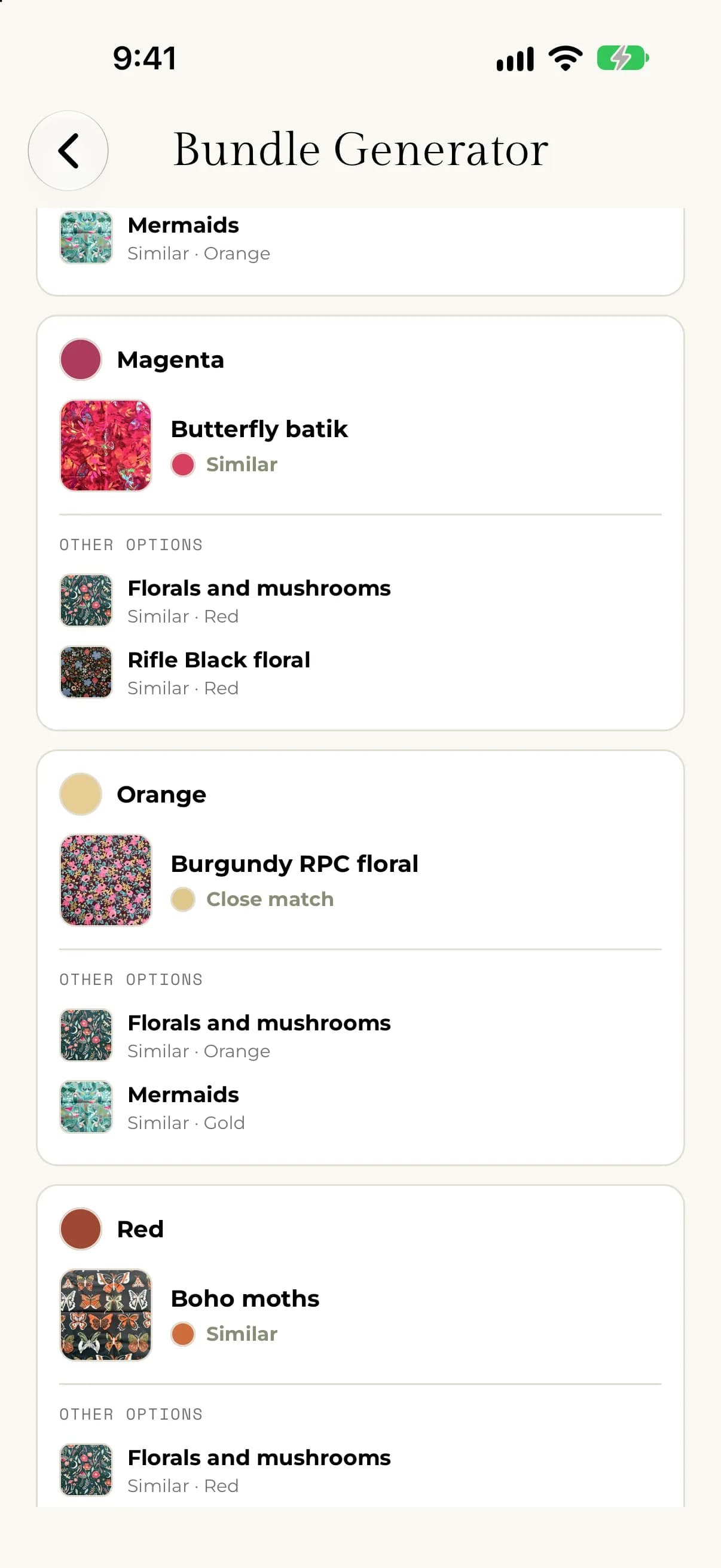
- Closeness follows how colors look to the eye. The app compares colors the way people see them, not by their code. A fabric is shown as Close match when it is hard to tell apart from the bundle color, and Similar when it is a useful nearby alternative. Anything farther away is left out rather than shown as a poor match.
- Dominant colors win ties. A fabric whose dominant color matches is ranked slightly ahead of one that only matches through an accent color.
- Different fabrics are preferred. The app tries not to suggest the same fabric for every bundle color, so you see a spread across your stash.
- A fabric you started from comes first. If you began from a fabric in your stash, it is chosen for the first bundle color whenever it is close enough.
Read the results
For each bundle color you see the best match: the fabric name, the color of that fabric that matched, and Close match or Similar. Tap one of the fabrics under OTHER OPTIONS to show it instead. You see up to three fabrics per bundle color. Changing the displayed match is only for your planning and doesn't change your stash.
On the web, other fabrics are listed under Alternatives, and choosing one is read-only.
If something goes wrong
- If you see "Your fabric stash is empty", add fabrics first. See Add a fabric with a photo.
- If you see "No fabrics are ready to match", only in-stock fabrics with confirmed colors can be matched. Update a fabric's quantity or confirm its colors, then tap Refresh fabric matches.
- If you see "No close matches in your stash", try another scheme or another seed color. You will also see "No close match in your stash for" a color when only some of the bundle colors have a match.
- If you see "We could not load your fabric stash.", tap Try again.