
Profile and account
Delete your account
Permanently remove your account and data, and what that includes.
Updated Nov 16, 2026 · iPhone, Android and web · 2 min read
Show steps for
You can delete your My Quilts account yourself. This is permanent and cannot be undone.
Before you start
- Save your projects. Deleted projects cannot be recovered. Export your projects first if you want a copy.
- Check your subscription. Deleting your account does not cancel a Premium subscription for you. See Manage or cancel your subscription.
What is deleted
Deleting your account removes:
- all your projects, with their photos, comments and likes
- your favorites and the list of quilters you follow
- the files stored under your account, such as your profile photo
- your profile and user data
- your sign-in, so you can no longer log in
- your community feed account
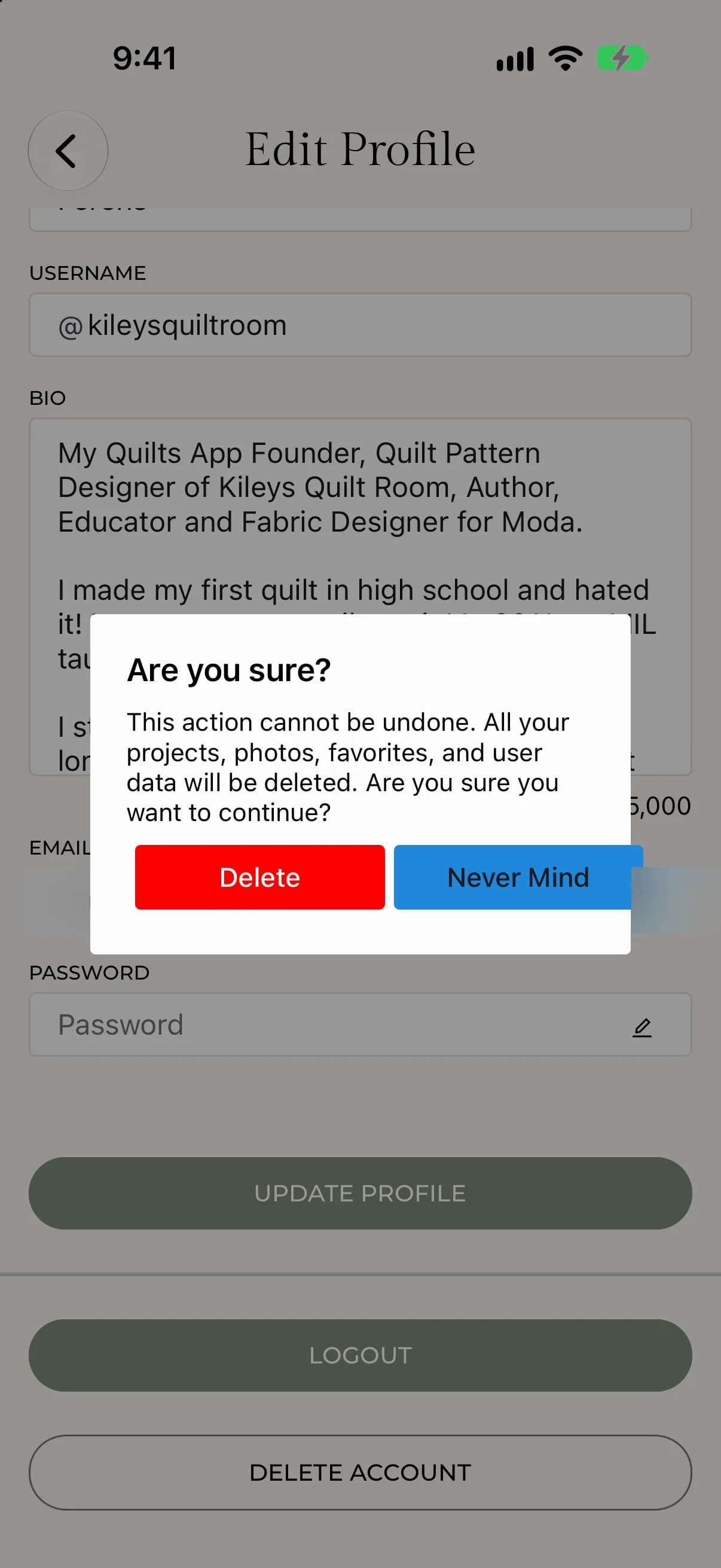
The app summarizes this as: all your projects, photos, favorites and user data will be deleted.
Delete your account
- Tap Menu, tap My Profile, then tap Edit Profile.
- Scroll to the bottom and tap Delete Account.
- Read the message under Are you sure? and tap Delete. Tap Never Mind to cancel.
- Keep the app open. Deleting can take a couple of minutes. When it finishes, you are logged out.
- Select My Profile, then select Edit Profile.
- In the Danger Zone at the bottom, select Delete Account.
- Read the message under Are you sure? and select Delete Account. Select Never Mind to cancel.
- Keep the page open. Deleting can take a couple of minutes. When it finishes, you are signed out.
If something goes wrong
If you see There was an unexpected error deleting your account, try again. If it keeps happening, contact support at support@myquilts.app.