
Curve piecing
Template sizes and sewing steps for quarter circles, semi circles and inset circles.
Updated Nov 16, 2026 · iPhone, Android and web · 3 min read
The Curve Piecing sheet covers quarter circles, semi circles and inset circles. Pick a method for the sewing steps, and a finished circle size to get the template sizes.
Choose a method
Tap Cheat Sheets, then Curve Piecing, then pick Quarter Circles, Semi Circles or Inset Circles.
Select Curve Piecing in the sheet list, then choose Quarter Circles, Semi Circles or Inset Circles next to Method.
All three methods start with a frame piece (X) and a circle piece (Y). Pinch the pieces to make creases, match the creases, pin, and sew slowly with a 1/4" seam allowance.
- Quarter circles: pinch each piece in half to make a center crease. With right sides together and the curves facing opposite directions, align the creases and pin. Force the curve of the frame to follow the quarter circle, pin the ends and sew. Press toward the inside of the curve.
- Semi circles: pinch each piece in half and in half again to make 3 creases. Align the center creases, pin at the creases and at the ends, and sew. Press toward the inside of the curve.
- Inset circles: fold the frame and the inner circle in half 3 times and press the folds to make creases. Lay the frame on top of the inner circle, both right side up, with the creases aligned. Starting at the top edge, pull the frame edge down toward the center until both curves are aligned, and pin where the creases match. Repeat on each crease, then sew 1/4" around the circle. Press toward the center.
Find your template sizes
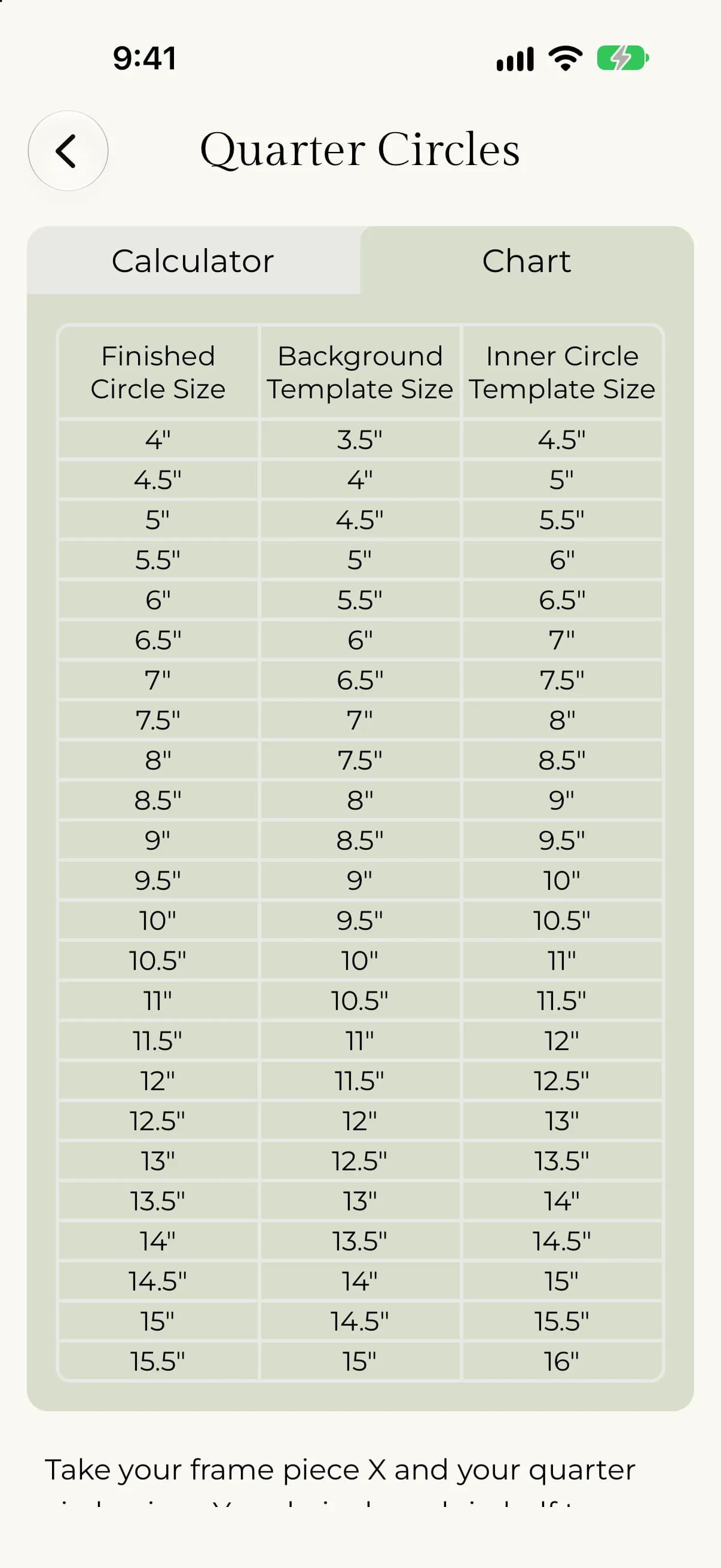
The sheet lists a background template size and an inner circle template size for each finished circle size, from 4" up to 15.5".
- The background template size is 1/2" smaller than the finished circle size.
- The inner circle template size is 1/2" bigger than the finished circle size.
For example, for a finished circle of 6", the background template is 5.5" and the inner circle template is 6.5".
- Open a method.
- Tap Chart at the top.
- Find your Finished Circle Size in the first column.
- Read Background Template Size and Inner Circle Template Size across the row.
- Choose a method.
- Next to Finished circle size, use − and + or type a number. The smallest size is 4".
- Read the Finished circle size, Background template size and Inner circle template size cards.
- Check the highlighted row in the Reference chart.